


 Optical Transceiver
 DAC/AOC Cable
 Fiber Cabling
 Networking
Blog, Network Cabling
VLAN vs Subnet: What is the Difference?
Jun
In today’s digital environment, networks are extremely important. As networks continue to grow, proper network segmentation and planning become more important as well. VLANs and Subnets are two distinct methods and concepts for dividing networks. They work at different OSI layers and achieve network segmentation in completely different ways. This article explains the concepts and differences between VLAN vs subnet.
Table of contents
OSI Model Layers
It will be useful to have an understanding of the OSI Model before understanding VLANs and subnets. The OSI Model helps one understand how networks work and how data is transmitted across them.
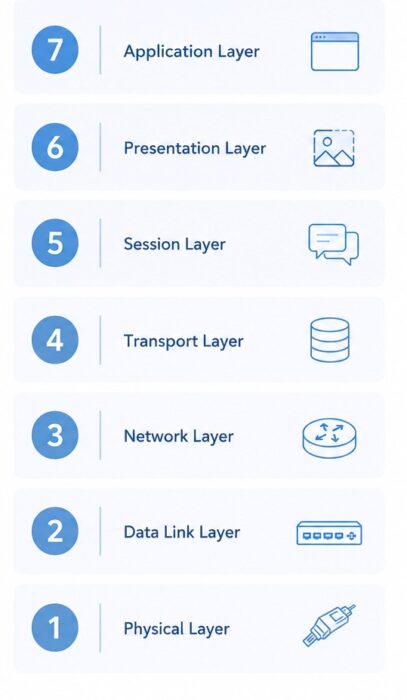
- Physical layer: The physical transmission of electrical signals and optical signals.
- Data link layer: Transmission of frames from one device to another and MAC addresses.
- Network layer: IP addressing and routing.
- Transport layer: End-to-end connection and TCP/UDP.
- Session layer: Setting up, managing, and terminating communication sessions.
- Presentation layer: Data presentation and encryption/decryption.
- Application layer: User network services (HTTP, FTP, SMTP).
VLANs mainly operate at Layer 2, while Subnets mainly operate at Layer 3. This is also one of the biggest differences between them.
What is a VLAN
VLAN (Virtual Local Area Network) is a logical network segmentation technology implemented through switches. VLAN operates at Layer 2 of the OSI model, the Data Link Layer. In a traditional LAN, all devices connected to the same switch belong to the same broadcast domain by default, and broadcast traffic is sent to all ports. In this situation, a large amount of broadcast traffic can affect network performance.
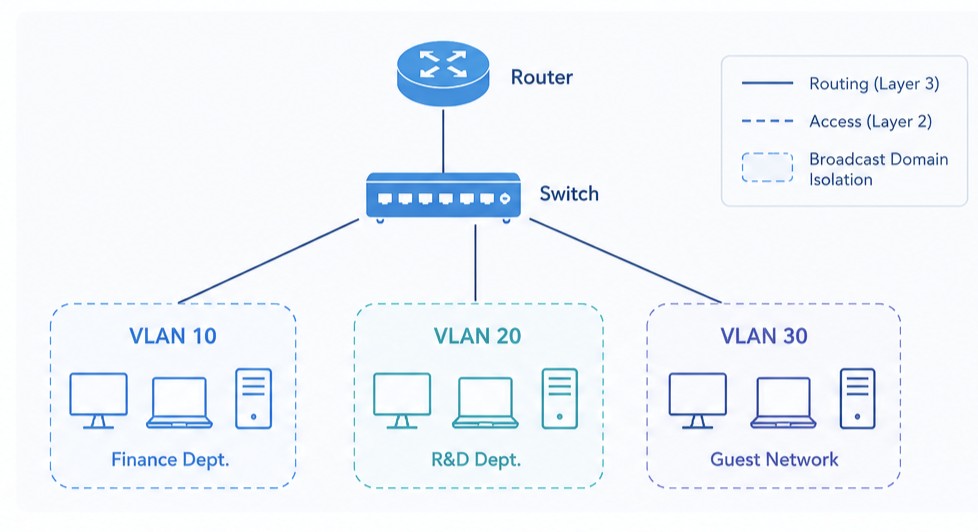
VLANs create multiple logical networks inside a switch and separate devices in the same physical network into different broadcast domains. This allows devices connected to the same switch to be managed as separate networks.
For instance, an enterprise-level network could have its finance department computer systems assigned to VLAN 10, the research and development department to VLAN 20, and the guest network to VLAN 30. By design, traffic from one VLAN cannot directly interact with traffic in another VLAN.
How to Create VLANs
Setting up VLANs is normally done on switches, although the exact command varies by vendor. The first task involves creating VLAN IDs for various services or departments. Once this is done, the switch ports are assigned to their respective VLANs. For instance, we have ports 1 to 8 assigned to VLAN 10 and ports 9 to 16 assigned to VLAN 20. This converts the logical separation to physical implementation. Switch uplinks, which are supposed to carry traffic from multiple VLANs, are configured in trunk mode with 802.1Q tagging.
VLAN Advantages
- A VLAN is useful since network segmentation can be achieved without installing additional switches, thus saving money.
- Network segmentation can help different services operate separately.
- Data broadcasts will remain within a VLAN, reducing network traffic.
- The use of VLAN makes it more secure since different services will not be able to communicate.
VLAN Limitations
- The use of a VLAN does not replace routing services; it can only perform Layer 2 segmentation.
- Large-scale VLANs can lead to increased management difficulties as well as configuration errors that can cause data breaches.
What is a Subnet
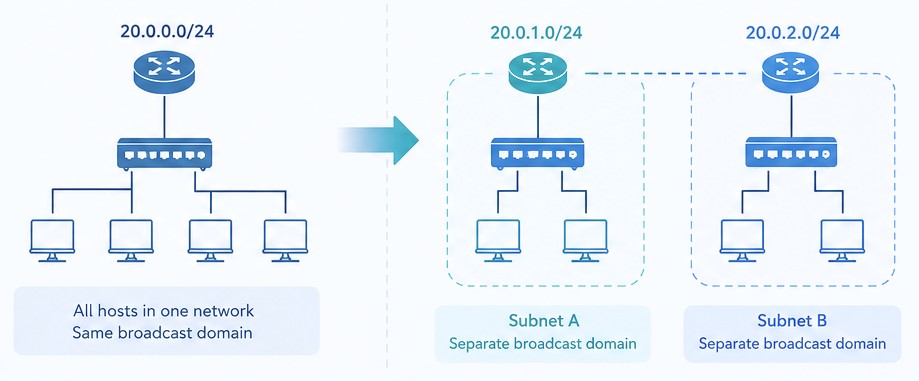
Subnet is a method of dividing a network by using IP addresses and operates at Layer 3 of the OSI model, the Network Layer. VLAN vs Subnet, A subnet divides a large network into multiple smaller logical networks, and each network has its own network address and host address range.
For example, 192.168.1.0/24 can be divided into two subnets: 192.168.1.0/25 and 192.168.1.128/25. Communication between different subnets requires routing through Layer 3 devices. While VLAN mainly focuses on separating broadcast domains, Subnet focuses more on IP address planning, routing control, and network-layer management. In an enterprise network, office devices may use the 192.168.10.0/24 subnet, servers may use 192.168.20.0/24, and surveillance devices may use 192.168.30.0/24. Different subnets help organize the network structure and control access.
How to Create Subnets
Subnet design primarily focuses on creating IP addresses and subnet masks. As such, if a firm has an IP 192.168.1.0/24, it can subdivide the IP to suit its needs for the available hardware. Hardware for offices that may require approximately 100 IPs will have 192.168.1.0/25, while server hardware requiring approximately 50 IPs will be given 192.168.1.128/26. Hardware for networking purposes requiring roughly 20 IPs will be assigned 192.168.1.192/27. Once the IP allocation is complete, router or Layer 3 switch gateways are configured.
Subnet Advantages
- Better usage of IP addresses prevents wastage of IP addresses.
- Decrease in broadcast storms and enhanced network performance.
- Easier to expand the network and assign IP addresses.
- Helpful in fault location and management in case of a very big network.
- Used together with ACLs and firewalls to provide better control.
Subnet Limitations
- It can make address allocation difficult if the network is very large and the subnet design is improper.
- Interconnection of subnets requires routing devices.
VLAN vs Subnet
Modern networks are already highly developed, and network segmentation rarely relies on only one method. In most cases, VLANs and Subnets are used together.
For example, a company may place the finance department in VLAN 10 and assign it the 192.168.10.0/24 subnet. The R&D department may be placed in VLAN 20 and use the 192.168.20.0/24 subnet. This approach provides both Layer 2 isolation and Layer 3 address planning. This combined deployment method is very common in modern enterprise networks. The choice between VLAN and Subnet depends on the actual needs of the network.
When to Use Them in Real Development
When a company wants to isolate different departments without buying additional physical switches, a VLAN is usually the most direct solution. Deploying separate switches for every department increases equipment costs and also increases maintenance work. In this situation, multiple VLANs can be created on the same switch, and different ports can be assigned to different logical networks. If the company expects frequent organizational changes or device relocations, VLAN vs Subnet, VLANs provide greater flexibility.
However, when the size of the network expands and requires a well-designed IP management and routing structure, a subnet is preferable to a VLAN. Once the network has been divided into several subnets, routers and Layer 3 switches will be able to instantly know which direction packets need to be sent to. This facilitates effective networking. Besides, a subnet is frequently applied in server networks. To distinguish among compute nodes, storage nodes, and management networks, many data centers establish subnets such as 10.10.1.0/24 for GPU servers, 10.10.2.0/24 for the storage, clusters, and 10.10.3.0/24 for management networks.
For most modern enterprise networks, cloud platforms, and AI data centers, a single 400G or 800G OSFP switch may connect hundreds of server ports. Using both VLAN and Subnet together is usually the most practical solution. VLANs handle broadcast domain isolation, while subnets handle IP communication. Together, they form a complete network architecture. OPTCORE is always pleased to offer the best service for your data center infrastructure.
-

Generic Compatible 100G QSFP28 SR4 850nm 100m Transceiver
US$ 29.90 (Excl. VAT) -

Generic Compatible 400G DR4 QSFP-DD 1310nm 500m MTP/MPO-12 Transceiver
US$ 429.00 (Excl. VAT) -
Generic SFP-10G-T Compatible 10GBASE-T SFP+ RJ45 Copper 30m Transceiver
US$ 29.90 (Excl. VAT) -
LC-LC 10G OM3 Multimode Duplex LSZH Fiber Optic Patch Cable
Price range: US$ 2.80 through US$ 40.70 (Excl. VAT)
FAQ
#1 Are VLANs and subnets the same thing?
No, VLANs work at Layer 2 to isolate broadcast domains, whereas subnets work at Layer 3 to separate IP networks.
#2 Can a VLAN have more than one subnet?
Yes, although not a good practice in most enterprise settings, it is possible to have more than one subnet in a VLAN.
#3 Can a subnet span multiple VLANs?
Typically, no; subnets normally map to single VLANs in enterprise networking.
#4 Does subnetting decrease broadcast traffic?
Yes, smaller subnets lower the size of the broadcast domain and increase efficiency.
Conclusion
VLANs and subnets are fundamental building blocks of modern network architecture. Understanding their concepts and differences about VLAN vs Subnet is an essential part of learning networking technologies. Flexible network segmentation and proper resource management help build a more efficient, scalable, and secure network environment.
Read more
- What is CDR? A Beginner’s Guide to Clock Data Recovery
- dB vs dBm: Understanding the Difference in Fiber Optic Measurement
- What Is Optical Return Loss: A Beginner’s Guide
