


 Optical Transceiver
 DAC/AOC Cable
 Fiber Cabling
 Networking
Blog, Network Cabling
What is Multi-Gig Ethernet? A Beginner’s Guide
May
In the current digital work environment, data is like air. But have you ever thought that the “pipe” of the network supporting this data flow could be overwhelmed by the business’s growth rate? If you are worried about network bottlenecks and are looking for a cost-effective network upgrade, you might need multi-gig Ethernet. This article discusses a technology that is changing a firm’s network structure.
Table of contents
What is Multi-Gig Ethernet?
Multi-Gigabit Ethernet is an Ethernet technology that can achieve speeds above 1 Gbps over existing copper cables.
In 2016, the Institute of Electrical and Electronics Engineers (IEEE) formally announced the IEEE 802.3bz standard, which established a unified standard for 2.5Gbps and 5Gbps Ethernet connections, enabling these “intermediate speeds” to operate over existing CAT5e and CAT6 cabling. This standard is called “NBASE-T” in the industry, and major companies such as Cisco, Acacia, Freescale, and Xilinx jointly promote its development.
Multi-gig Ethernet is a technology system that supports multiple speeds rather than a single rate.
2.5GBASE-T (2.5 Gbps): the throughput is about 312.5 MB/s, roughly 2.5 times that of traditional Gigabit Ethernet, and is sufficient to meet demands such as 4K video streaming, remote offices, and everyday data backup.
5GBASE-T (5 Gbps): throughput is about 625 MB/s, suitable for high-density Wi-Fi environments, large file transfers, and video production.
10GBASE-T (10 Gbps): It can be implemented with Cat6a or higher cable and is suitable for data centers, media post-production, and very high-performance applications.
Note that the multi-gigabit Ethernet port is backward compatible, automatically negotiating and adapting to the highest speed supported by the connected device, enabling seamless switching from 10 Mbps to 10 Gbps.
Why do you need Multi-Gig Ethernet?
The Wi-Fi 6 theoretical rate can reach 9.6 Gbps, and Wi-Fi 7 can reach 46 Gbps, but if the access port’s upstream port is only 1 Gbps, the wireless network is not able to use the high-speed rate of Wi-Fi at any speed, and the gigabit wired link is the most restricted part of the entire network. If you need to upload 2 TB of project data to the cloud, it will take 4 to 5 hours at 1 Gbps. On the other hand, in the 2.5 Gbps connection, the time can be cut in half or more, and efficiency improves.
With the widespread adoption of SaaS platforms, cloud services, and devices such as Salesforce and Microsoft 365, network pressure in corporate networks continues to rise, and 1 Gbps is an important bottleneck that limits efficiency.
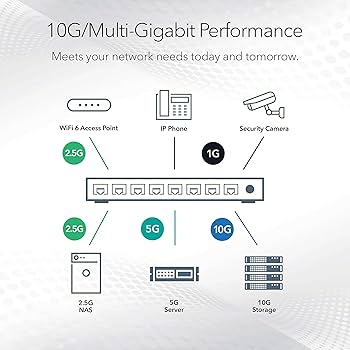
Figure 1: 10G/Multi-Gig performance (source from Google)
The technical principles behind Multi-Gig Ethernet
Multi-gig Ethernet can be faster over older network cables, depending on the modulation technology upgrade. 10GBASE-T employs 16-stage pulse amplitude modulation (PAM-16), with each symbol representing 3.125 bits of data; the actual transmission rate per transmission line pair is only 800 Mbps, and the required transmission bandwidth is greatly reduced. On the other hand, in 2.5GBASE-T, the narrower spectral bandwidth (200 MHz or 100 MHz instead of 400 MHz) allows stable operation with traditional CAT5e and CAT6 cables because the cable shielding requirements are lower.
| Cable type | Supported MultiGig speeds | Maximum transmission distance | Remark |
| Cat 5e | 2.5Gbps | 100 meters | High-quality Cat 5e can support 5 Gbps over short distances |
| Cat 6 | 2.5G/5Gbps | 100 meters | Short distances (≤ 55 meters) can support 10 Gbps. |
| Cat 6a | 10Gbps | 100 meters | New network recommendation for use |
The Advantages of Multi-Gig Ethernet
- Saving money. Multi-gig Ethernet can be deployed directly over existing CAT5e and CAT6 copper cabling, significantly reducing the impact of remodeling costs and installation time on everyday operations.
- Filling the blank of velocity, no longer forced to a lower speed. There is no intermediate gear between the traditional Gigabit and Gigabit standards. When the 2.5G device is connected to a 1G switch port, it automatically drops to 1 Gbps, wasting performance. The multi-gig switch allows the connection to operate at the port’s maximum speed (2.5 G or 5 G), completely resolving this awkward situation.
- Adapt to the future, not easily outdated. With the acceleration of broadband and the popularization of cloud applications and NAS, 2.5G is becoming the new “entry-level high-speed.” Choosing a multi-gigabit switch is equivalent to reserving growth space for the network in the coming years
- Automatic negotiation, plug-and-play. The multi-gig port automatically identifies the connected device’s capabilities (100M, 1G, 2.5G, 5G, or 10G), operates at the highest speed supported by both devices, and requires no manual configuration. The threshold of luck is very low.
How to choose Multi-gig
You can emphasize the following parameters when selecting a multi-gig switch.
- Combine port type and rate. We recommend selecting a port that supports 100 M/1 G/2.5 G/5 G/10 G multirate, is compatible with multiple devices, and adapts to deployments that include a mix of old and new devices.
- PoE power supply specification. If you plan to power wireless APs, IP cameras, or digital signage, choose a model that supports PoE++ (802.3bt)—up to 90W per port, enough to drive the current most power-consuming Wi-Fi 7 access point.
- Backplane bandwidth and transfer capability. The switch’s backplane throughput must exceed the total traffic requirements of all connected devices to prevent it from becoming a bottleneck.
- Manageable. To facilitate traffic scheduling, security policy configuration, and remote operation, we recommend choosing a network-managed switch that supports features such as VLANs, QoS, and SNMP.
FAQs
Q: Simply put, what is Multi-Gig Ethernet?
A: Multi-gig Ethernet is a technology that can achieve transmission speeds of 2.5 Gbps, 5 Gbps, or even 10 Gbps on ordinary copper cables. Its greatest value lies in allowing you to continue using existing Cat 5e or Cat 6 Ethernet cables while achieving much faster network speeds than traditional gigabit networks.
Q: Do I need to replace all network cables to achieve 2.5G or 5G?
A: In the vast majority of cases, it is not necessary. This is precisely the core advantage of multi-gig.
Q: Which should I choose between Multi-Gig and 10G Ethernet?
A: It depends on your requirements. 10G Ethernet offers higher speeds but requires high-quality network cables; for long distances, Cat 6a or fiber-optic cables are necessary, leading to high overall upgrade costs. Multi-Gig has a lower speed, but it costs less.
Q: Can multi-gig ports automatically adapt to devices of different speeds?
A: Sure, this is one of its standard features. The Multi-Gig port supports automatic negotiation, intelligently identifies the speed of the connected device (from traditional 10 Mbps to 10 Gbps), and automatically matches the highest speed that both devices can support, truly achieving plug-and-play functionality.
Q: Is the “2.5G/5G/10GBase-T” port on the switch universal?
A: Yes. Ports with this type of identification are multi-gig ports. When selecting a switch, it is recommended to choose ports that explicitly support multiple speeds (100M/1G/2.5G/5G/10G), so that both new and old devices can be flexibly compatible regardless of their connection
Conclusion
For operators of telecommunications components, the proliferation of multi-gigabit ecological standards means that the switch itself is not only fast but also supports the included CAT6/CAT6A jumpers, fiber-optic modules, SFP+ connectors, and PoE power supplies.
Multi-gig Ethernet is an ideal technology for incremental upgrades to the corporate network, allowing you to bridge the gap between 1 G and 10 G at a reasonable cost by “smart upgrading” existing copper infrastructure.
Read more
- Best 2.5G Ethernet Switch Guide: Unlock The Multi-Gig Connectivity
- What Is a Multi-Gigabit Switch: Features & Top Picks
- What Is PoE Media Converter: A Complete Guide (2026)
