






Blog
How to Check If My SFP Is Single Mode or Multimode

Feb
In fiber networks, SFP modules are usually split into single-mode and multimode. They might look almost identical from the outside, but knowing the difference is important. If you want to check SFP single mode or multimode, sometimes the info is easy to find on the product page or from the seller. But in real work, especially when dealing with older modules or replacements, it’s not always that simple.
For example, during network maintenance, you may remove an old SFP module from a switch with no label, no box, and no clear specs. At that point, figuring out whether it is single-mode or multimode becomes tricky.
If the type is misjudged, it can easily lead to problems such as:
- Unstable links
- Not knowing which fiber patch cable to use
- Extra troubleshooting time
That is why learning how to correctly identify an SFP module is very useful. Below, we will walk through several practical ways to do it, from the easiest checks to more technical methods.
How to Identify Whether an SFP Is Single Mode or Multimode
To make a clear judgment, it helps to look at the module from different angles.
We will start with the most basic information and then move to more technical, engineering-based methods, so you can choose what works best for you.
#1: Checking the product information
The most common clues come from product descriptions and module labels. On our product pages, you will see shortcodes such as SR or LR. They directly point to the module type.
- SX or SR: usually means a multimode SFP
- LX/EX/ZX or LR/ER/ZR: usually indicate singlemode SFP
#2: Checking the color of the pull tab
Additionally, observing the color of the optical module’s pull tab is a straightforward way to check it.
- Multimode: Pull tabs are typically black.
- Single-mode: Pull tabs are usually blue or yellow.
Recommended products
-

Generic SFP-1G-SX Compatible 1000BASE-SX SFP 850nm 550m Transceiver
US$ 5.00 (Excl. VAT) -

Generic SFP-1G-LX Compatible 1000BASE-LX/LH SFP 1310nm 10km-20km Transceiver
US$ 5.00 (Excl. VAT) -

Generic SFP-10G-SR Compatible 10GBASE-SR SFP+ 850nm 300m Transceiver
US$ 7.80 (Excl. VAT) -

Generic SFP-10G-LR Compatible 10GBASE-LR SFP+ 1310nm 10km Transceiver
US$ 12.00 (Excl. VAT)
#3: Checking the datasheet and the matching fiber cable
Another very direct method is checking the datasheet. At the top of most specifications, you will often see SMF or MMF. This tells you both the module type and what kind of fiber it should be used with.
- SMF: means the module is designed for single-mode fiber. Single-mode fiber is usually yellow. It can be simplex or duplex, and simplex fiber is often used with BiDi modules.
- MMF: means the module is designed for multimode fiber. Multimode fiber is usually orange (OM2) or aqua blue (OM3).
Because of this, simply looking at the color and type of the connected patch cable can already give you a strong hint. Our product datasheet typically provides this information in detail.
#4: Checking the wavelength
Multimode SFP modules usually operate at 850nm. This is because multimode fiber has a larger core, letting light travel along multiple paths. At 850nm, the devices are mature, cost-effective, and efficient, making them perfect for short distances. But when light splits across multiple paths, interference can build up over longer runs.
Single-mode SFPs usually work at 1310nm or 1550nm. Single-mode fiber has a very thin core, letting light travel mostly in a straight path. This keeps signals stable over long distances, which is why you see these modules used for links between buildings, campuses, or data centers.
So in practice, wavelength is a very useful clue. If you see 850nm, it is very likely a multimode module.If you see 1310nm or 1550nm, you are almost certainly looking at a single-mode one.
#5: Checking switch information
On many switches, you can use commands such as
show interface transceiver details
to view detailed information about the inserted module.
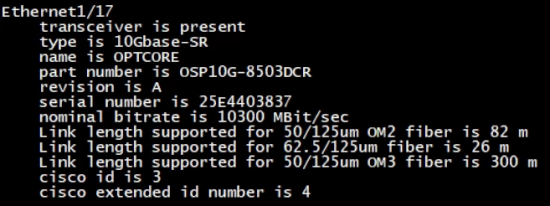
The output may not directly say “single mode” or “multimode,” but it usually shows wavelength, part number, and other details. Combined with what we discussed earlier, this is often enough to make a clear judgment.
Using test tools
Devices such as optical power meters and OTDRs are often used during troubleshooting. They will not label a module as single mode or multimode for you, but by looking at power levels, loss, and link behavior, you can usually confirm what kind of module and fiber you are dealing with.
Typical Use Scenarios
When it comes to usage, single-mode and multimode are not about which one is better. They are built for different jobs.
Single-mode SFPs are mainly used when distance matters. They are mainly used for long-distance connections, such as links between buildings or data centers. The drawback is that they usually cost more and may require more careful compatibility and setup.
Multimode SFPs, on the other hand, are simpler and more cost-effective. They are widely used inside data centers and for short links where distance is not a concern. That said, they are not designed for large-scale expansion or long-distance connections, and their limitations show up quickly once the link gets longer.
Conclusion
Being able to check whether an SFP is single mode or multimode helps you understand a lot about the module itself. Type markings, working wavelength, compatible fiber, datasheets, and even what your switch reports can all give clues. Learning this skill can save time when deploying new links or maintaining existing ones. A lot of network headaches start with a simple mix-up between single-mode and multimode SFPs.
Read More
- How to Convert Multimode to Single-mode Fiber: A Complete Guide
- Single Mode vs Multimode Fiber, What is The Difference?
